Business Process Automation vs Robotic Process Automation: Choosing the Smarter Strategy with Zoho Experts
.png)
As businesses scale, so do their operational complexities. Manual work multiplies, processes break down, and teams lose visibility across workflows. The result? Slower service, missed opportunities, and overburdened staff.
Automation is the logical fix—but the question is: should you invest in Business Process Automation (BPA) or Robotic Process Automation (RPA)?
They sound similar but serve different purposes. Knowing which to choose—and how to align it with your Zoho ecosystem—can be a game-changer for long-term growth.
What Is Business Process Automation (BPA)?
Business Process Automation is the end-to-end streamlining of core workflows across departments like sales, finance, HR, and operations. It replaces repetitive tasks, reduces manual handovers, and creates connected, intelligent processes that scale.
How Zoho Enables BPA
With Zoho tools, BPA becomes not only accessible but highly customizable. Through platforms like:
Zoho CRM – Automate sales pipelines, lead scoring, and follow-ups
Zoho Books – Trigger invoicing based on CRM deal stages
Zoho People – Streamline onboarding, attendance, and payroll
Zoho Flow – Integrate all apps for seamless data exchange
Zoho Creator – Build custom applications to automate niche processes
When implemented strategically with the help of Zoho consultants, BPA becomes the foundation for system-wide optimization.
What Is Robotic Process Automation (RPA)?
Robotic Process Automation uses software bots to mimic human actions—like copying data between systems, clicking through screens, or generating reports from legacy applications.
RPA is ideal when:
Systems don’t support APIs or integrations
You need to automate isolated, rule-based tasks
Your business uses older software without automation capabilities
However, RPA operates on the surface level. It’s reactive, task-specific, and often fragile—any UI change can break the bot’s functionality.
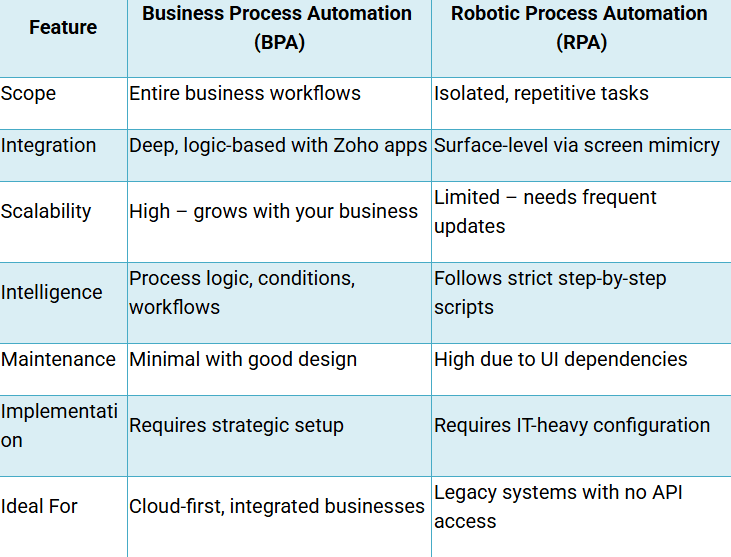
Key Differences: BPA vs RPA
Why BPA Is a Better Fit for Modern Businesses Using Zoho
Business Process Automation is not about patching gaps—it’s about building smarter workflows from the ground up. With Zoho’s interconnected ecosystem, BPA can:
Automate lead-to-cash processes from CRM to Books
Reduce manual data entry by syncing CRM, Desk, and Projects
Enable role-based task assignments and escalations
Offer real-time analytics through Zoho Analytics
Replace spreadsheets and emails with structured, auditable flows
BPA supported by Zoho consulting services ensures that automation isn’t just deployed—it’s aligned with business logic, department goals, and long-term scalability.
Common Use Cases: BPA vs RPA
BPA with Zoho:
Lead capture, assignment, and scoring via Zoho CRM
Automatic invoice generation post deal-closure in Zoho Books
Customer onboarding across Zoho People and Zoho Projects
Multi-step approval workflows using Zoho Creator
Automated notifications, escalations, and data sync with Zoho Flow
RPA Example:
A bot logs into a bank portal daily
Downloads transaction reports
Pastes the data into a spreadsheet
Emails it to finance
While RPA handles this task, it doesn’t offer deeper integration, logic branching, or future adaptability.
When to Use RPA
There are scenarios where RPA is necessary—especially in environments with outdated software, no integration capabilities, or heavy compliance restrictions. In such cases, RPA can serve as a temporary bridge while migrating to a more scalable, API-friendly system like Zoho.
The Role of Zoho Consulting in BPA Success
Successful BPA isn’t just about tools—it’s about process strategy. This is where Zoho consultants provide immense value:
Auditing and mapping existing business processes
Identifying automation opportunities and wasteful workflows
Recommending the right Zoho tools for your structure
Designing custom logic using Zoho Flow, CRM Blueprints, and Creator
Training teams for seamless adoption
Offering ongoing support as your business scales
Expert Zoho consulting ensures automation fits your operations—not the other way around.
Real-World Impact: BPA in Action
Industry: Consulting
Problem: Disconnected tools across sales, service, and billing
Solution:
Zoho CRM auto-assigns leads and notifies sales
Zoho Projects triggers new onboarding once a deal closes
Zoho Books sends milestone invoices based on project stages
Zoho Desk logs all support tickets tied to the project
Zoho Analytics offers real-time profitability dashboards
Results:
60% drop in operational delays
35% faster sales cycle
90% reduction in manual handovers
Complete visibility across all departments
This transformation didn’t rely on bots—it was powered by BPA and guided by Zoho consulting services.
Final Thoughts
While RPA offers quick wins for repetitive tasks, BPA delivers strategic transformation. And with Zoho’s unified platform, BPA becomes a scalable, intelligent, and cost-effective solution for modern businesses.
The difference lies in approach—Zoho consultants don’t just automate tasks. They design systems that think, connect, and scale with your business. If your goal is sustainable growth, BPA with Zoho isn’t just the smarter choice—it’s the essential one.
FAQs
Can we use both BPA and RPA?
Yes. Many companies use RPA as a short-term fix and BPA as a long-term strategy, especially when transitioning from legacy systems to Zoho’s cloud-based suite.
Is BPA suitable for small and medium businesses?
Absolutely. With Zoho’s flexible licensing and modular apps, SMBs can implement BPA affordably and scale over time.
What makes BPA more reliable than RPA?
BPA is based on structured logic and system integrations. It’s less prone to errors and easier to maintain than UI-dependent RPA bots.
How does Zoho consultancy improve automation success?
Zoho consultants understand both business needs and technical implementation. They bridge the gap between strategy and execution—ensuring automation aligns with business goals.
How long does a BPA implementation take with Zoho?
Depending on complexity, a typical implementation may take 3–8 weeks for SMBs. Larger rollouts may extend with multiple departments and legacy system dependencies.


This comment has been removed by a blog administrator.
ReplyDelete